How to read your truck’s door jamb sticker
Your door jamb labels hold every truck-side number a payload check needs: GVWR, GAWR, and the occupants-and-cargo figure that is your payload. Where each is.
Updated September 12, 2026
Two labels, not one
Your truck carries two separate labels, not one, and mixing them up is the most common mistake people make when they go looking for a number. Both usually live in the same general spot — the driver’s door jamb, or on the B-pillar behind the door on some trucks — but they hold different information and serve different purposes.
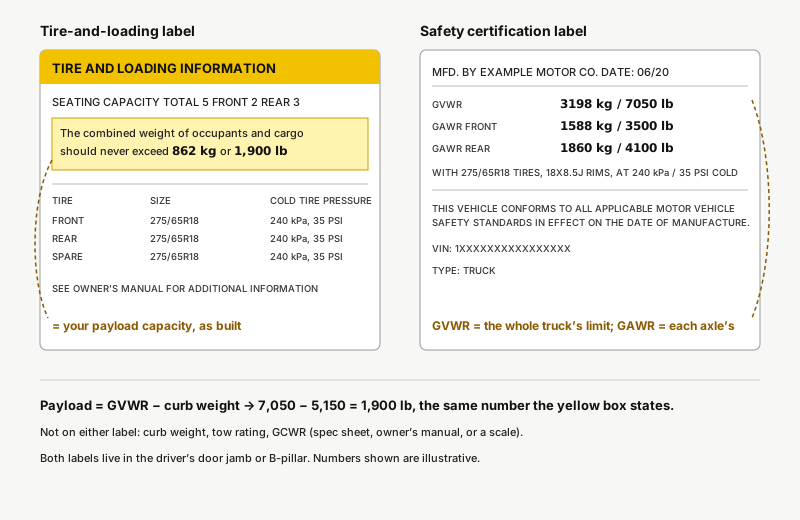
One is the tire-and-loading information label. It gives you the payload figure, the tire size, and the cold inflation pressures for this specific truck. The other is the safety certification label, which gives you the truck’s weight ratings, its date of manufacture, and its VIN. The tire-and-loading label has a yellow header band; the certification label is plain white or silver. Both matter — but you need to know which one you’re reading before the numbers on it mean anything.
The tire-and-loading label
This is the label drivers usually go looking for first, because it answers the question everyone actually has: how much can I load into this thing? Look for a sentence that reads something like “the combined weight of occupants and cargo should never exceed XXX kg or XXX lb.” That figure is your payload capacityfor this truck exactly as it left the factory — engine, cab size, four-wheel drive, tow package and every other option already accounted for.
The same label also lists the tire size your truck was built with and the cold inflation pressures for the front and rear tires. Cold means before you’ve driven on them; pressures read after a few miles on a hot day will run higher and shouldn’t be adjusted down to match the sticker. Keep tires at the pressures on this label, not the number molded into the tire’s own sidewall — the sidewall figure is the tire’s maximum, not what your truck was engineered around.
The certification label
The certification label is the denser of the two, and it defines your truck’s limits rather than just restating one of them. Three numbers matter here. GVWR (gross vehicle weight rating) is the maximum your truck is allowed to weigh once loaded — people, cargo, fuel, everything. GAWR (gross axle weight rating) is printed twice, once for the front axle and once for the rear, and each one caps how much weight that specific axle can carry regardless of what GVWR allows overall.
Without a weight-distribution hitch, a heavy trailer tongue lands on the rear axle — and because the ball sits behind it, the rear axle picks up more than the tongue weight while the front axle sheds some — so it’s possible to exceed the rear GAWR before the truck’s total weight comes anywhere near GVWR. The two limits fail independently, and this label is where both of them are printed together. Below the weight ratings, the same sticker carries the truck’s date of manufacture and its VIN. Neither affects a weight calculation, but they’re useful for matching this exact truck to a recall notice or a parts lookup, so it’s worth knowing where they live.
Numbers that are not on the sticker
Three numbers people go looking for on these labels and never find: curb weight, tow rating, and GCWR (gross combined weight rating — the truck and a loaded trailer together). None of them are printed on either door jamb label, because none of them are properties of the frame and axles the way GVWR and GAWR are — though a few recent trucks add a third trailering label next to them that lists GCWR, curb weight and maximum trailer and tongue weight.
Curb weight — what the truck weighs empty, full tank, no people or cargo — comes from the manufacturer’s spec sheet for your exact trim, or from driving the empty truck onto a certified scale. Tow rating and GCWR are typically in the owner’s manual’s towing section, and they shift with engine, axle ratio and cab size. If the manual isn’t handy, the manufacturer’s towing guide for your model year usually has the same tables broken out by trim.
Reading it in the app
Typing a number off a small sticker in poor light is exactly the kind of manual-entry step that gets skipped or fat-fingered, so TowCheck reads it for you instead. Photograph the tire-and-loading label with your phone and the app reads the occupants-and-cargo figure straight into payload — the number a check actually needs. Photograph the certification label instead and it pulls the GVWR, for when you’d rather work from GVWR minus curb weight. Scan the tire-and-loading label and there’s nothing left to type; scan the certification label and you still add curb weight yourself. You get one free scan for the truck and one free scan for the trailer.
Worked example
| Item | Weight (lb) |
|---|---|
| Truck GVWR (certification label) | 7,050 lb |
| Truck curb weight | −5,150 lb |
| Payload (tire-and-loading label) | 1,900 lb |
| People in the cab | 400 lb |
| Tongue weight (5,000 lb trailer) | 600 lb |
| Total against payload | 1,000 lb |
| Remaining | 900 lb |
Follow the two labels all the way through and here’s where it lands. This truck’s tire-and-loading label reads “the combined weight of occupants and cargo should never exceed 1,900 lb” — that figure sits on top of a certification-label GVWR of 7,050 lb and a curb weight of 5,150 lb, since 7,050 minus 5,150 is exactly 1,900. Put 400 lb of people in the cab, hitch a 5,000 lb trailer with a 600 lb tongue, and that tongue weight counts against the truck’s payload the same way a passenger does: 400 lb of people plus 600 lb of tongue weight is 1,000 lb, leaving 900 lb of the label’s 1,900 lb still unspent.
The truck side of that math needed no scale — GVWR and the occupants-and-cargo figure came straight off the two labels; the people’s weight and the loaded tongue weight are the two things you supply. It’s also exactly what the calculator below runs for you, and the occupants-and-cargo figure alone is enough to start it — the calculator uses that payload figure directly when you give it one, no GVWR or curb weight required — so you can check a different trailer or a fuller cab before you actually hitch up.
Run your own numbers
The free calculator runs the same check the app does — no sign-up, nothing stored.
Open the calculator with this exampleOr check your own rig on the homepage — four numbers, one tap.
Frequently asked questions
Why doesn’t the payload on my sticker match the brochure?
The sticker describes this truck — the exact engine, cab, axle and option combination that left the factory on your VIN. The brochure figure is almost always the lightest possible configuration, which weighs less at the curb and so shows a bigger payload number than the truck actually sitting in your driveway.
What is GAWR?
Gross axle weight rating — the maximum weight one specific axle can carry, printed separately for front and rear. Without a weight-distribution hitch, a heavy trailer tongue lands on the rear axle — and because the ball sits behind it, the rear axle picks up more than the tongue weight while the front axle sheds some — so it’s possible to exceed the rear GAWR before the truck’s total weight comes anywhere near GVWR.
Is the sticker’s payload before or after a full tank?
Fuel is already included in curb weight by convention, so the payload figure on the label assumes a full tank. Passengers, cargo and tongue weight are not included — those are what the “occupants and cargo” figure is there to cap.
What if the sticker is unreadable?
Faded, painted over or peeling stickers happen on older trucks. The manufacturer’s towing guide or a dealer’s VIN lookup can give you the GVWR for your build, and the app’s “answer a few questions” path can estimate a payload figure from year, make and model.